
Recording a whole night with Voice Memos
Settings to check before bed, so the memo is still running in the morning.
Yes, Voice Memos can record a whole night on iPhone. Apple does not list a maximum length for a memo, so what decides whether you wake up to a full recording is free storage, battery and anything that interrupts the microphone during the night. Plug the phone in, keep the audio quality on Compressed, silence calls, and the memo will usually still be running when you wake up.
Below is the setup, the mistakes that cut a recording short, and what to do with an eight-hour file in the morning.
Before bed: four settings to check
- Audio quality. Open Settings, then Apps, then Voice Memos (on older iOS versions, Settings, then Voice Memos) and set Audio Quality to Compressed. Lossless files are several times larger, and snoring and speech sound the same either way.
- Free storage. Settings, General, iPhone Storage shows what is left. If the phone is nearly full, the recording can stop when space runs out. Free some room first.
- Calls and notifications. Turn on Do Not Disturb or your Sleep Focus. A phone call or another app playing sound can interrupt the memo, and you will not know until the morning.
- Power. Plug the phone in. Recording with the screen off uses little battery, but a phone that starts the night at 20 percent may not make it to 7 a.m.
Where to put the phone
- On the nightstand, about an arm’s length from your head. Closer picks up every rustle of the sheets. Much farther, and quiet sleep talk gets lost under the room’s background.
- Microphone end towards the bed, nothing covering it. Not under the pillow, not inside a case pocket, not behind a lamp.
- Away from fans and air purifiers if you can. A steady hum is fine for finding loud moments, but it lifts the room’s background and hides soft sounds.
- If you share the bed, put the phone on your side. Otherwise most of what you hear will be your partner.
Start, lock, sleep
Open Voice Memos, tap the red button, and lock the phone. The red microphone indicator in the status bar or the Dynamic Island tells you it is still listening. You do not need to keep the app on screen.
In the morning, open Voice Memos and tap the red button again, or the Done button, to stop and save. Check the length shown under the memo: if it ends at 2 a.m., something stopped it, usually a call, low storage or the battery.
Getting the file off the iPhone
Voice Memos saves an M4A file. To use it anywhere else:
- In Voice Memos, tap the memo, then the more button (three dots), then Share.
- Choose Save to Files, and pick a folder you can find again.
- On a Mac signed in to the same Apple Account, memos also appear in the Voice Memos app on the Mac if iCloud syncing for Voice Memos is on.
Once you are done with a night, delete the memo and then empty Recently Deleted in Voice Memos, or it keeps using space for a while.
Finding the moments in eight hours of audio
Nobody listens to a whole night. The free sleep recording analyzer on this site reads the M4A in your browser tab, measures the background of the room and marks every moment that is louder than it on a timeline. Moments that repeat every 2 to 8 seconds, at the pace of breathing, are flagged, since long runs of those are usually snoring. You tap a moment to hear it. The file is never uploaded.
A few habits make the results easier to read:
- Note the time you started recording. Enter it in the analyzer and the timeline shows clock times, so “a long run at 3:40 a.m.” is easy to match to how you slept.
- Record more than one night. One night can be odd. Three or four tell you what is normal for you.
- Keep the setup the same. Same phone, same spot, same distance. Then nights compare fairly.
If you are trying to work out whether what you hear is snoring or talking, see snoring or sleep talking.
Limits of the Voice Memos method
- Large files. A night is one long file per recording. It is easy to fill a phone if you record every night and forget to delete.
- No labels. A memo is just audio. You or the analyzer still have to work out what each loud moment was.
- Privacy in a shared room. Tell anyone sleeping in the room that you are recording.
- Not a sleep study. A recording can show what the room heard. It cannot measure breathing, oxygen or sleep stages.
If you want to do this every night
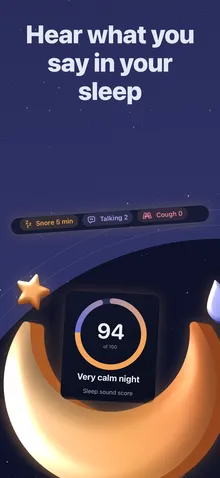
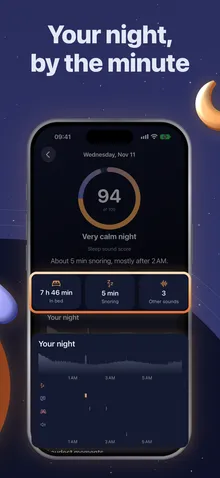
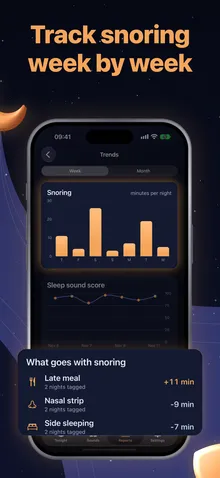
Nocturne for iPhone is built for exactly this job. You tap Record my sleep, and it listens from the nightstand with an on-device sound classifier that tells snoring, sleep talk, coughs and loud noises apart. Instead of keeping eight hours of audio, it saves a short clip around each moment, so storage stays small, and clips delete themselves after the number of days you pick. In the morning you get a timeline of the night and a list of moments to play. Recording is free every night; nothing is uploaded and there is no account. Nocturne reports sounds, not health, and is not a medical device.
Every night, without scrubbing
Nocturne listens from the nightstand and keeps a clip of each moment.
- Listens for
- Snoring, sleep talk, coughs, loud noise
- Keeps
- A short clip around each moment
- Sleep talk
- Turned into text on your iPhone
- Each morning
- A score, a timeline by the minute, the moments
- Without Pro
- Every night recorded, the latest report, its three loudest clips
- Stays
- On your iPhone. No account, nothing uploaded

Before you record
Can Voice Memos record for 8 hours?
Yes, as long as the iPhone has enough free storage and stays charged. Apple does not list a maximum length for a memo, so the practical limits are storage and battery. Plug the phone in and check free space before bed.
Does Voice Memos keep recording when the screen is locked?
Yes. You can lock the iPhone after starting the memo and it keeps recording. A red indicator in the status bar or Dynamic Island shows that the microphone is in use.
Will a phone call stop a Voice Memos recording?
A call or another app taking over the audio can interrupt the recording. Turn on Do Not Disturb or your Sleep Focus before you start, so nothing rings during the night.
Should I use Compressed or Lossless for a night recording?
Compressed. A night of lossless audio takes several times the space and gives you nothing extra for hearing snoring or sleep talk.
How do I find the snoring in a long memo?
Share the memo to Files, then open it in the free sleep recording analyzer on this site. It marks every moment louder than the room on a timeline, so you only play those moments.
More on snoring and sleep talk
- Do I snore? Check last nightPick a night recording and hear every loud moment. Nothing is uploaded.
- Snoring or sleep talking?Both wake the room at 3 a.m. On a recording they sound nothing alike.
- Sleep talking recorderTwo ways to hear what you say at night, both on your iPhone.
- Why do people talk in their sleep?How common it is, what sets it off, and when it is worth a closer look.
- How loud is snoring?What the decibel figures mean, and how to measure your own snoring at home.
- When your partner's snoring keeps you awakeFixes for the snorer, fixes for you, and how to talk about it without a fight.
- Coughing at night: record it, then count itA few nights of recording tell a doctor more than "I cough a lot at night".
- How to stop snoring: find out what works for youChange one thing at a time, record the nights, and let the recordings decide.
- Snoring or sleep apnea?What to listen for on a recording, and what only a sleep study can tell you.
- How to tell if you snore, using your iPhoneapps.cihat.dev